
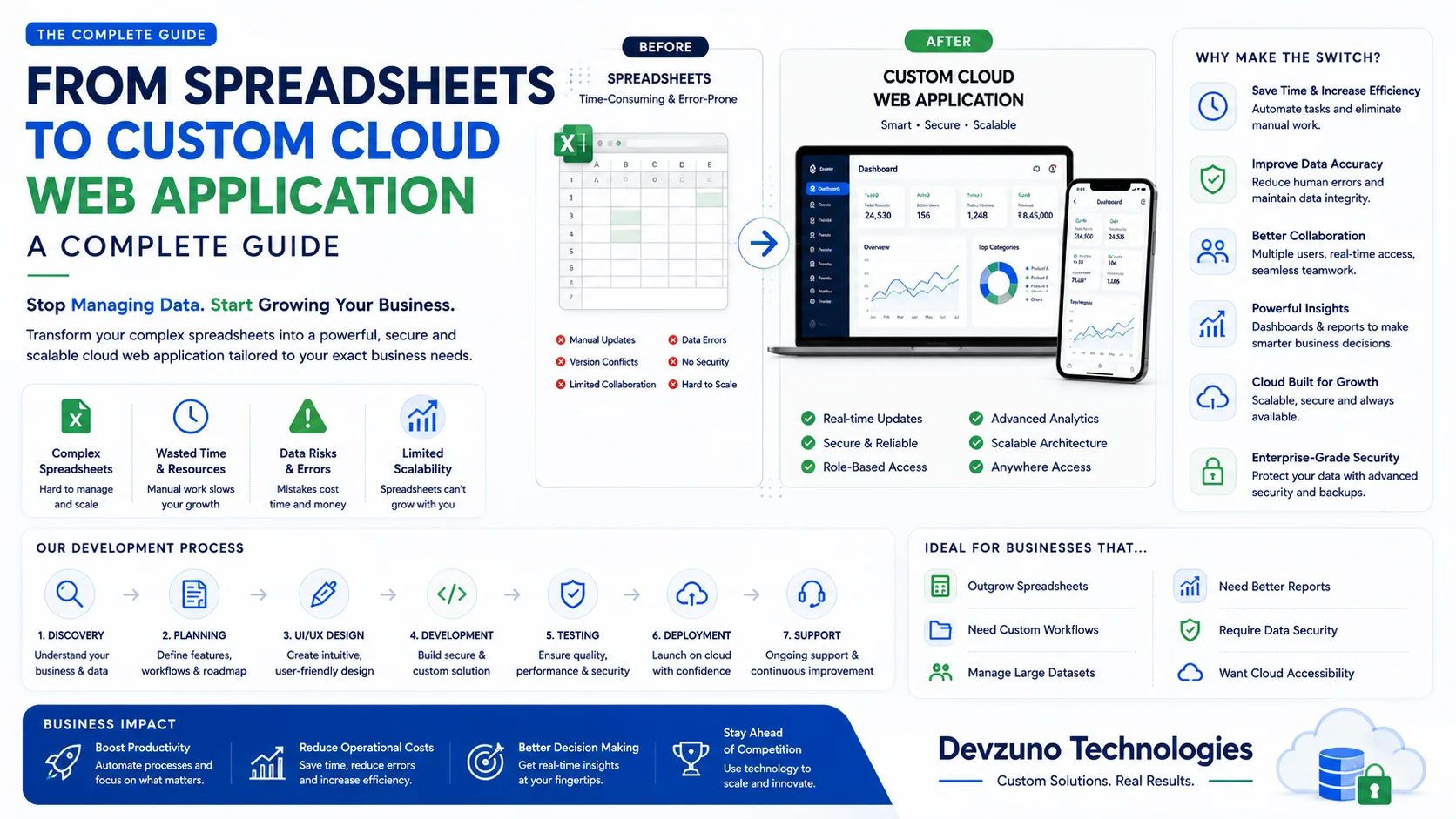
In 2026, thousands of growing Indian businesses—including manufacturing units, wholesale distributors, logistics firms, and professional service agencies—rely heavily on Microsoft Excel or Google Sheets to manage core operations. Spreadsheets often start as an inexpensive, flexible tool for tracking inventory, sales leads, purchase orders, and employee payroll.
However, as business transaction volume grows and team size expands, managing operations on spreadsheets inevitably leads to a severe operational bottleneck. Broken VLOOKUP formulas, accidental cell overwrites, file corruption, lack of user permission controls, and version confusion (“Final_v3_Updated_Jan2026.xlsx”) create costly business errors.
Converting legacy spreadsheets into a custom, multi-user cloud web application transforms your business operations. A custom web portal provides centralized data security, real-time team collaboration, automated approval workflows, and interactive analytics dashboards accessible from any web browser or mobile device.
In this comprehensive migration guide, we analyze the hidden risks of spreadsheet dependency, compare custom code against no-code tools, outline a 5-step database migration framework, examine modern web architecture, provide an itemized cost breakdown in Indian Rupees (₹) and USD ($), and demonstrate how digital transformation drives operational efficiency.
1. The Hidden Risks & Costs of Managing Operations on Spreadsheets
While spreadsheets appear free or inexpensive on the surface, their structural limitations create substantial hidden costs for growing businesses:
| Operational Metric | Legacy Excel / Google Sheets | Custom Cloud Web Application (Devzuno Architecture) |
|---|---|---|
| Data Integrity & Validation | High risk (Accidental cell edits, broken formulas) | Strict Database Constraints (Zero formula errors) |
| Multi-User Concurrent Access | File locking errors, sync conflicts, lagging sheets | Unlimited Concurrent Users (Real-time database sync) |
| Role-Based Access Control | Weak (Users see entire sheet or no access) | Granular User Roles (Admin, Manager, Staff views) |
| Audit Logging & Security | No record of who changed specific numbers | 100% Complete Audit Trail (Timestamps & User IDs) |
| Automated Workflows | Manual copy-pasting & manual email sending | Automated Email/WhatsApp Alerts & PDF Invoices |
| Mobile Usability | Horrible (Pinch-zooming massive tables on phones) | Responsive Mobile UI (Custom web & mobile layouts) |
Empirical Industry Data on Spreadsheet Failures
- The 88% Error Rate: Academic studies on corporate spreadsheets reveal that over 88% of complex business spreadsheets contain critical calculation errors, often caused by unverified range selections or corrupted formulas.
- Lack of Data Security: Standard spreadsheets cannot restrict sensitive financial columns (such as purchase margins or salary data) while allowing staff to edit operational rows.
- Inability to Scale: Large Excel files containing over 50,000 rows become painfully slow to open, calculate, or save over local network shares.
2. Low-Code / No-Code Tools vs. Custom Web Applications
When evaluating spreadsheet replacements, business leaders often consider low-code tools like Airtable, Smartsheet, or Microsoft PowerApps. Below is a comparison to help you choose the right path:
| Metric | No-Code Tools (Airtable / PowerApps) | Custom Full-Stack Web App (Devzuno Architecture) |
|---|---|---|
| Monthly Pricing Model | Expensive per-user monthly SaaS fees ($20–$45/user/mo) | Zero Monthly Per-User Fees (Pay once for custom software) |
| Data Volume Limit | Capped record limits per table (50k–100k rows max) | Millions of Records (PostgreSQL scalable storage) |
| Custom UI Flexibility | Rigid pre-built drag-and-drop components | 100% Custom Tailored UI/UX |
| Third-Party API Control | Restricted to supported platform plugins | Unlimited REST/gRPC API Integrations |
| Source Code Ownership | Vendor lock-in (Zero code export) | 100% Full Source Code & Database Ownership |
3. Core Features of a Custom Cloud Web Application
Converting your business processes to a custom cloud web portal replaces chaotic spreadsheet tabs with structured, high-speed software modules:
1. Granular Role-Based Access Control (RBAC)
Define exact user permissions for every department within your company:
- Administrators: Full system configuration, financial reporting access, user management, and audit log viewing.
- Department Managers: Approve purchase orders, manage team tasks, and edit department records.
- Field Staff & Operators: Input daily operational data via simplified mobile-friendly forms without viewing sensitive financial margins.
2. Relational Database Normalization (PostgreSQL)
Replaces flat, duplicated spreadsheet columns with a normalized relational database schema. Customer details, product SKUs, and order line items are stored cleanly in separate tables linked by primary and foreign keys.
3. Automated Real-Time Dashboard & KPI Charts
Eliminate hours spent manually generating weekly Excel bar charts. Custom web applications feature interactive, real-time analytics dashboards (using Chart.js or Tremor) that display daily revenue, inventory stock-outs, and pending approvals automatically.
4. 1-Click PDF Generation & Excel Export
Generate professional, branded PDF invoices, purchase orders, and delivery challans with a single click. Maintain the ability to export filtered data tables to .xlsx or .csv whenever required for tax audits.
5. Complete Audit Trail & Change History
Every data creation, modification, or deletion event is recorded automatically in an immutable system audit log, capturing the exact timestamp, IP address, user ID, and before-and-after values.
6. Automated Email & WhatsApp Workflow Triggers
Trigger automated email notifications or WhatsApp alerts whenever a purchase order exceeds budget limits, inventory drops below safety thresholds, or a customer payment becomes overdue.
4. Technical System Architecture & Formula Migration
Migrating from flat spreadsheets to a cloud web portal requires converting legacy formulas into database constraints and backend API logic:
[Browser / Mobile Web Frontend (React / Astro)]
                 │
                 ▼ (Secure HTTPS / REST APIs)
     [Node.js / Go Backend API Gateway]
                 │
  ┌──────────────┼──────────────┐
  ▼              ▼              ▼
[Auth Service] [Data Engine]  [Audit Logger]
  │              │              │
  └──────────────┼──────────────┘
                 ▼
 [PostgreSQL Database (Normalized Schema)]
Translating Excel Formulas into Code
- VLOOKUP / INDEX-MATCH -> SQL JOINs: Instead of fragile cell lookups, SQL
INNER JOINandLEFT JOINqueries combine customer profiles with invoice records in microsecond response times. - SUMIFS / COUNTIFS -> SQL Aggregations: Complex multi-condition Excel totals are executed directly on the database engine using
SUM() GROUP BYqueries, indexed for lightning speed. - Nested IF Statements -> Backend Business Logic: Fragile, unreadable nested IF formulas are converted into clean, maintainable TypeScript / Go functions with automated unit tests.
5. The 5-Step Spreadsheet Migration Framework
At Devzuno Technologies, we follow a proven 5-step migration framework to convert complex spreadsheet systems into custom web applications without business interruption:
Step 1: Process Discovery & Formula Audit
Our software architects analyze your existing Excel/Google Sheets files, mapping hidden macro scripts, cell formulas, data inputs, and manual approval handoffs across departments.
Step 2: Database Schema Design & Normalization
We convert flat spreadsheet tabs into an optimized relational database schema (Entity-Relationship Diagram - ERD) in PostgreSQL, defining tables, foreign keys, constraints, and data indexes.
Step 3: Full-Stack Web App Engineering
We build intuitive web interfaces tailored to your team’s workflow, implementing role-based access control, search filters, automated form validation, and dashboard charts.
Step 4: Automated Data ETL (Extract, Transform, Load) & Data Cleaning
We write custom Python/Node.js ETL scripts that ingest your historical Excel data, clean up duplicate records or formatting inconsistencies, and populate the new cloud database cleanly.
Step 5: User Acceptance Testing (UAT) & Parallel Run
Your team tests the new web application alongside the old spreadsheets for 1 to 2 weeks to verify calculation accuracy before decommissioning legacy Excel files completely.
6. Cost Breakdown for Spreadsheet-to-Web-App Conversion in India (2026)
Custom web application development costs depend on the number of spreadsheet tabs being migrated, user role complexity, and third-party API integrations. Below is an itemized pricing guide for Indian businesses in 2026:
| Web Application Tier | Capability Scope & Deliverables | Estimated Cost (INR - ₹) | Equivalent USD ($) | Delivery Timeline |
|---|---|---|---|---|
| Starter Business Web App | Single Department Tool, Simple CRUD Tables, User Auth, Basic PDF Export | ₹1.2 Lakhs – ₹3 Lakhs | $1,500 – $3,600 | 4 – 7 Weeks |
| Standard Operations Portal | Multi-Department Workflow, Role-Based Access (RBAC), Interactive Charts, Audit Log | ₹3 Lakhs – ₹7.5 Lakhs | $3,600 – $9,000 | 8 – 13 Weeks |
| Enterprise Operations ERP | Multi-Warehouse Sync, Custom BI Engine, Third-Party ERP/Accounting API, WhatsApp Bot | ₹7.5 Lakhs – ₹18 Lakhs+ | $9,000 – $21,500+ | 14 – 22+ Weeks |
Itemized Module Pricing Matrix
If you are planning a modular migration:
- UX Wireframing & Database Schema Design: ₹25,000 – ₹60,000
- Frontend Web Portal (React / Astro): ₹50,000 – ₹2.2 Lakhs
- Backend API & PostgreSQL Database Engine: ₹45,000 – ₹1.8 Lakhs
- Historical Excel Data Ingestion & ETL Cleanup: ₹20,000 – ₹50,000
- PDF Invoice Engine & Analytics Dashboards: ₹30,000 – ₹75,000
- QA Testing & Cloud Server Deployment: ₹20,000 – ₹45,000
7. Real-World Industry Case Studies
Converting spreadsheets into custom web software yields dramatic operational improvements across industries:
Case Study 1: Manufacturing Production & Inventory Tracker
- Before: A manufacturing plant in UP tracked raw material inventory and daily machine output across 12 separate Excel files, causing frequent stock-outs and inaccurate material requirements.
- After: Devzuno engineered a custom cloud web portal accessible on shop-floor tablets. Material usage updates in real-time, reducing inventory holding costs by 22%.
Case Study 2: Wholesale B2B Order & Billing Portal
- Before: A wholesale distributor recorded orders manually in Google Sheets, requiring 3 office staff members to re-type data into Tally accounting software every evening.
- After: A custom web application allowed field sales staff to enter orders directly on mobile devices. Automated Tally API sync eliminated manual data entry, saving 15 hours per week.
8. Data Security, Disaster Recovery & Row-Level Security (RLS)
Cloud web applications deliver enterprise-grade data safety that local Excel files cannot match:
- Automated Daily Backups: Automated point-in-time PostgreSQL database snapshots stored in encrypted secondary cloud locations.
- PostgreSQL Row-Level Security (RLS): Enforcing security policies at the database level so regional managers can only query data belonging to their assigned branch or territory.
- SSL Encryption: All web traffic encrypted via TLS 1.3 to prevent data snooping over public Wi-Fi networks.
9. Frequently Asked Questions (FAQ) for Business Owners
Q1. How long does it take to convert a complex Excel sheet into a web application?
A simple single-department spreadsheet migration takes 4 to 7 weeks. A comprehensive multi-department business operations portal with custom approval workflows and interactive dashboards requires 8 to 13 weeks.
Q2. Will our historical Excel data be safely preserved during migration?
Yes. We write automated ETL (Extract, Transform, Load) scripts that extract all historical records from your Excel/CSV files, clean up formatting inconsistencies, and import the data safely into the new PostgreSQL cloud database.
Q3. Can the web application work on mobile phones and tablets?
Yes! Unlike spreadsheets which require awkward pinch-zooming on smartphones, our custom web applications feature fully responsive UI layouts designed specifically for mobile screens, tablets, and desktop monitors.
Q4. Can the web app integrate with Tally or existing accounting software?
Yes. We build automated REST API and XML connectors that push approved invoices, sales records, and purchase vouchers directly into Tally Prime, Zoho Books, or QuickBooks automatically.
Q5. Are there any recurring per-user monthly license fees?
No. Unlike off-the-shelf SaaS tools (like Salesforce or Zoho) that charge high per-user monthly fees, Devzuno builds custom software with zero per-user monthly license fees. You own the application completely.
Q6. What happens if our Internet connection drops temporarily?
We can build progressive web application (PWA) capabilities with local browser caching (IndexedDB). Staff can draft data offline, which automatically syncs to the server once the connection is restored.
Q7. Will I own full source code and database rights?
Yes. At Devzuno Technologies, you receive 100% full source code ownership, private GitHub repository access, database schemas, and intellectual property rights upon project milestone completions.
Q8. What ongoing cloud hosting fees should we expect?
For small to medium business web applications with 10 to 100 active users, cloud hosting on AWS, Vercel, or DigitalOcean ranges from ₹1,000 to ₹4,000 / month.
10. Why Partnering with Devzuno Ensures Digital Transformation Success
At Devzuno Technologies, we help businesses digitize manual processes by engineering custom web applications, enterprise software, and mobile platforms. Explore our Devzuno Custom Web Development Services, check out our Custom Enterprise Engineering Solutions, or view our Devzuno Built Products Portfolio.
When you partner with Devzuno for your digital transformation, you get:
- Tailored Business Engineering: We design software that conforms 100% to your exact business workflows—no forced template compromises.
- Modern High-Speed Tech Stack: Built using Astro, React, Node.js, and PostgreSQL for sub-second page loads and rock-solid data integrity.
- Zero Monthly Per-User License Fees: Retain full financial ownership without paying recurring SaaS subscription fees as your team scales.
- 100% Source Code & Asset Ownership: Full ownership of GitHub repositories, IP rights, and database access from day one.
- Transparent Milestone Contracts: Clear pricing in Indian Rupees (₹) starting from ₹1.2 Lakhs with defined milestone deliverables.
Ready to Upgrade Your Spreadsheets to a High-Speed Web App?
Stop risking your business operations on broken formulas and file locking conflicts. Transform your spreadsheets into a secure, scalable cloud web application.
👉 Contact Devzuno Enterprise Architects Today to schedule a free technical consultation and receive a customized spreadsheet migration roadmap!